FA-06 / FA-07 / FA-08

Copy and paste parts within a studio set?

Copy and paste parts within a studio set?

10 Jul 2020, 08:10
A search of this forum on this subject didn't turn up much but one post suggested this is not possible. Is it?

If so, how?

Thanks

Re: Copy and paste parts within a studio set?

10 Jul 2020, 13:20
Hi,

Simple answer is yes you can copy and paste. Fuller answer would depend upon exactly what you want to copy and where you want to paste it?

Here is a video which shows a simple copy and paste operation:-

https://www.youtube.com/watch?v=md--CiGvSKE&frags=pl%2Cwn

Provide details and more specific advise can be given.

Re: Copy and paste parts within a studio set?

10 Jul 2020, 18:18
Thank you for your response. I want to copy and paste parts within a studio set - not the sequencer. So if I have a Studio set and I have piano in part 1, strings in part 2 and synth in part 3 I want to be able to copy, for example, the synth part to another unused part. say part 4.

I hope that is clearer

Thanks!

Re: Copy and paste parts within a studio set?

13 Jul 2020, 06:53
If you want to copy a Tone ( just the sound/patch) you don't use a copy function.

Presuming you are in a multi-track Studio Set,,,go to the track which has the TONE you want to use or move on another track...cursor to the TONE is highlighted....press ENTER (this will then show the TONE as stored in the TONE LISTS on your FA ....just note which of the 0-9 TONE CATEGORY SELECTION BUTTONS LIGHTS UP
e.g. 2 Keyboard/Organ.

Press EXIT and you are back to your STUDIO SET.

Now select the track you want the tone to to be used on...then press the SAME 0-9 CATEGORY BUTTON THAT LIT UP BEFORE....this will then load the same tone here. if you press the ENTER button it will again take you to the TONE LIST , which will let you confirm its the right one.

This will work both for preset tones and user tones which makes it easy to find the one your after in the long lists of tones in some categorise.

This will only find the basic tone as stored but not any refinements you have made via the sound modify nobs or the mixer settings.

I don't think there is anyway to copy all of the tone the settings in a particular track to another.

The main COPY function is focussed on the SEQUENCER settings; midi notes, programme change, control change, pitch bend, etc


Re: Copy and paste parts within a studio set?

13 Jul 2020, 07:08
Thanks very much for trying to help me 9blackoranges. I'm not using the FA06 in the way you are referring to. I use it live and have now incorporated another synth module into my setup. I was hoping to be able to copy parts in a Studio Set either within that Studio Set or to another Studio Set altogether. But so far I haven't found any way to do this and just have to manually create each part from scratch.

Really appreciate your time and trouble though so thank you so much :)

Re: Copy and paste parts within a studio set?

13 Jul 2020, 07:46
Hi again,

Sorry but I still can follow what your trying to do?

You say 'copy parts'..what do you mean by PART? And you say LIVE? And you have added another synth module?

Confused.

Re: Copy and paste parts within a studio set?

13 Jul 2020, 08:00
When you use the FA-06 with a DAW or when playing live where you want to stack sounds etc you use the FA-06 in a multi-part mode called a Studio Set. I am trying to copy and paste parts either within a Studio Set or between Studio Sets

Thanks

Re: Copy and paste parts within a studio set?

13 Jul 2020, 13:26
Do you mean ...

I want to play the keyboard but want each note to play simultaneously more than one type of sound?

Eg.Play a C Major chord on the keyboard and a piano, strings and Choir all play it.

This is called a Layer.

Re: Copy and paste parts within a studio set?

1 Aug 2022, 05:41
Hi !
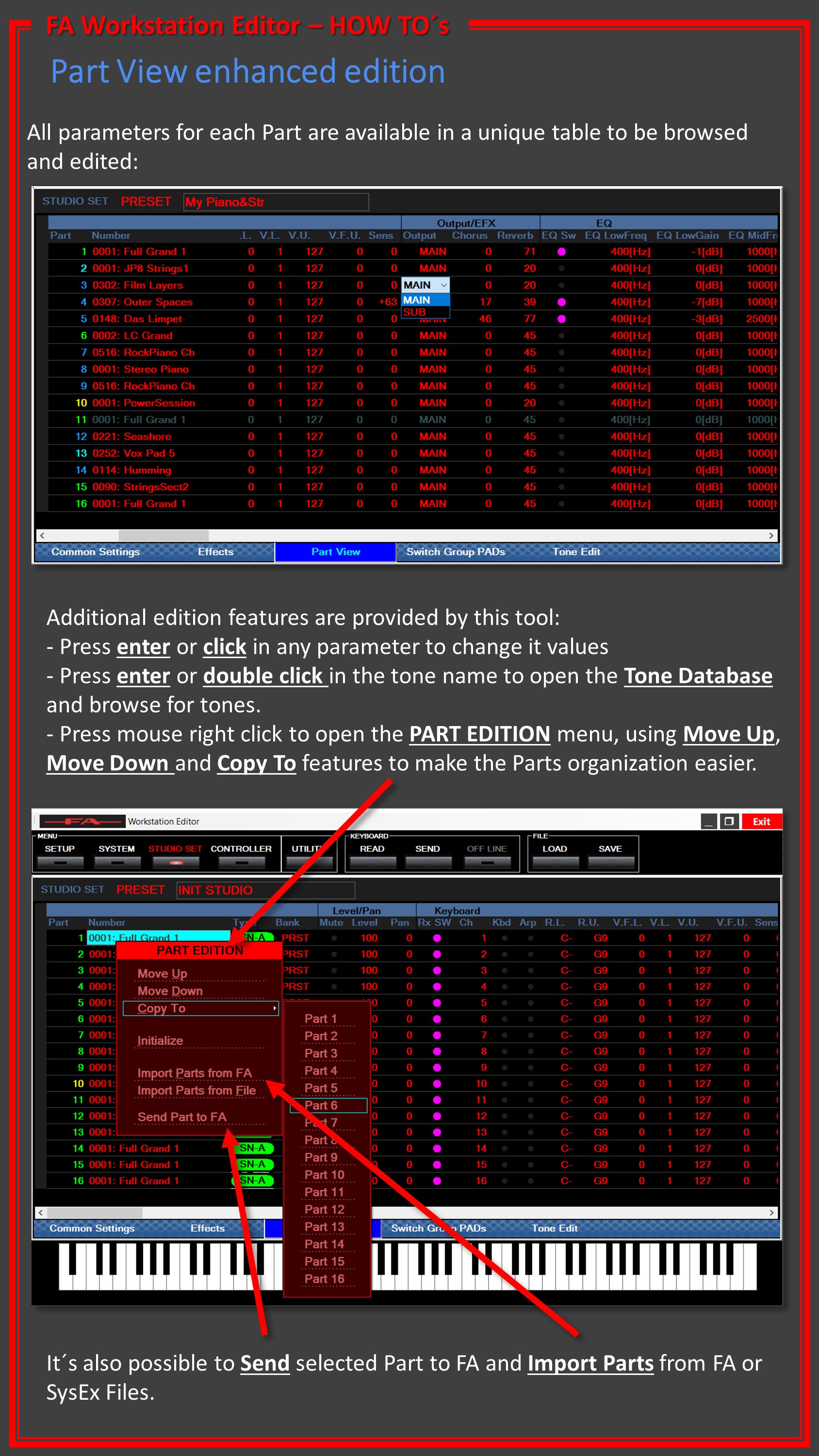
I've got the same question : in a studio set, I want to copy a part with all its data (tone, and all the settings of the part), for example from part 3 to part 4.
How can I do it with the keyboard interface. I can't believe Roland did not think of it !

← Back to FA-06 / FA-07 / FA-08