Fantom Platform

Fantom-7 (2019) MIDI-output suddenly absent!

Fantom-7 (2019) MIDI-output suddenly absent!

30 Aug 2020, 15:25
Fantom-7 (2019) MIDI-output suddenly absent!

So I have a brand new Fantom-7 delivered two days ago, August 2020. Its MIDI-OUT 1 port was connected to a MIDI Solutions T8 MIDI-thru box via five-pin DIN. Last night, it was sending MIDI note-data fine. Turned it on this morning—nothing. Cannot send any note data to any other module. Updated to 1.60 two days ago without issue. Any ideas?

• Tried a different MIDI cable.
• Bypassed MIDI-thru box and plugged directly to another module.
• Re-checked all MIDI settings.
• Disconnected Aira Link USB cable to MX-1.

Any ideas? Again, last night—working perfectly. Made no changes, now, no MIDI-output!
Re: Fantom-7 (2019) MIDI-output suddenly absent!

30 Aug 2020, 16:15
Hmmm . . . I pressed the top "SELECT" button and I can hear the external device, but now it only plays one part from the Fantom factory scene.
Last edited by studio460 on 30 Aug 2020, 18:46, edited 3 times in total.

Re: Fantom-7 (2019) MIDI-output suddenly absent!

30 Aug 2020, 17:40
Often, some changes made along your playing modify things...

First thing to do is saving the scene to a new slot, then selecting the same scene on the previous slot...

Imagine you are playing scene D100, you finish going in zone 11 from 100 volume to 0 volume. If you now play the scene, zone 11 will not sound...
No need to check cables...
Save scene D100 to D101 and then go back to D100...and play as if nothing had happened...

Re: Fantom-7 (2019) MIDI-output suddenly absent!

30 Aug 2020, 18:40
Haven't changed a thing. By the way, I had no problems on 1.10. I am now on 1.60. Here's my settings:

Fantom plays all parts; NO external MIDI sound:

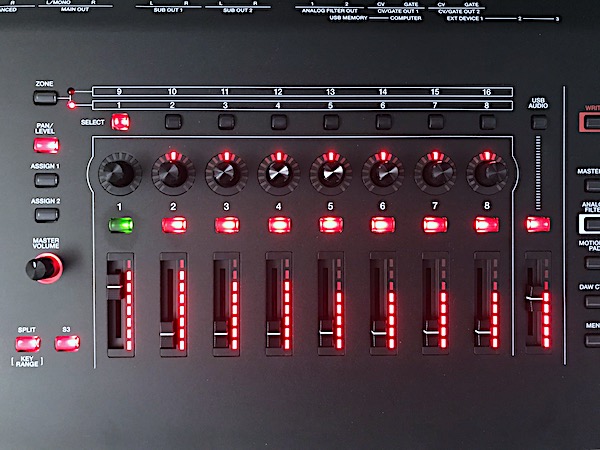
SELECT BUTTON 1 = "ON" [LIT]
PART BUTTON 1 = "ON" RED [LIT]

Fantom plays only ONE part from a factory scene; external MIDI instrument triggered—emits sound:

SELECT BUTTON 1 = "ON" [LIT]
PART BUTTON 1 = "OFF" [UNLIT]

Fantom plays all parts; NO external MIDI sound:

SELECT BUTTON 1 = "ON" [LIT]
PART BUTTON 1 SHIFT-CLICKED = "ON" GREEN [LIT]

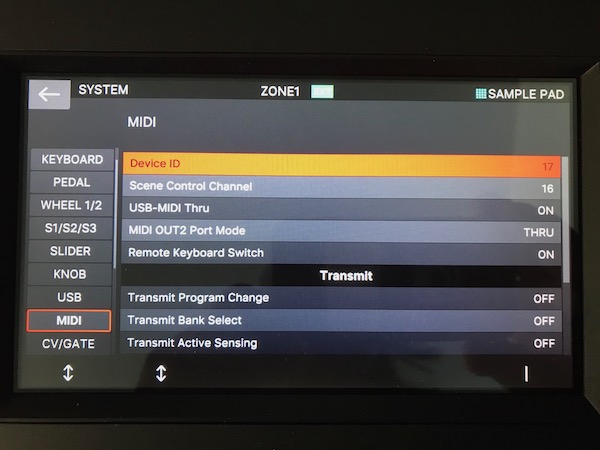
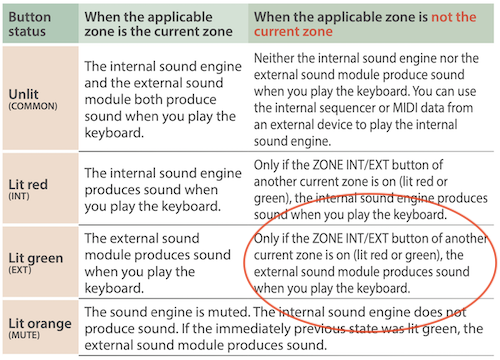
I am reading page 104 of the Roland Fantom Reference manual now, "Controlling an External MIDI Device (EXT MIDI OUT)." Below that is a shot of my MIDI settings screen. So, if I set the zone 1 button to green, the table below says the external module should play, but it doesn't. So to the right on the table, it explains the exception, but I'm not sure what they mean: "Only if the ZONE INT/EXT button of another current zone is on (lit red or green), the external sound module produces sound when you play the keyboard. —Roland reference manual; p. 104.

Image

External module DOES NOT play with these button settings:

Image

My current MIDI settings:

Image

Re: Fantom-7 (2019) MIDI-output suddenly absent!

30 Aug 2020, 23:19
Hi!
I reproduced (using MIDI USB with Cakewalk as DAW/VST) and it's work as should be.
I mapped a Rx MIDI Channel 1 on Cakewalk and set Zone 1 as Ext (green Lit) also put a Select button on Zone 1 and no other zones actives: playing keys, DAW produces sound properly

Then I set active Zone 1 (ext) and Zone 2 (int) and both devices generates sound properly (also toggling select between both zones)

Next step was checking ZONE EDIT MENU and scroll down till EXT(Green menu) OUT/PC to verify MIDI Tx PORT - I've set as "ALL" - and MIDI Tx Channel to 1.
I hope this can help you.

PS: As a suggestion, I recommend not using zone 1 for external devices as it is the only zone that allows using vPianos on Fantom.

Re: Fantom-7 (2019) MIDI-output suddenly absent!

31 Aug 2020, 03:44
Thanks for your reply. I tried doing this on zone 1 and zone 16. Only zone 1 works but plays only one part of the Fantom's internal sounds. Not sure what else I could be doing wrong. I set MIDI-recieve channels to both "all" and "16" (when attempting to set the external control on 16) on the external MIDI devices and neither one worked. Note that I'm only trying to trigger an external MIDI hardware device, attempting to send note-data to first, an FSR1, then to a DM12, etc.

I tried setting the OUT/PC port to both "ALL" and to "OUT1" (where the five-pin DIN is actually connected), and neither worked. I'm only using zone 1, because that's the only one I could get to send MIDI note-data to an external device (but I get only one part to play on the Fantom).

UPDATE: Okay, I got it to work by changing "TX ch" in ZONE EDIT to '1' instead of "16.'

← Back to Fantom Platform